How to add the Nord color scheme to the new Microsoft terminal app
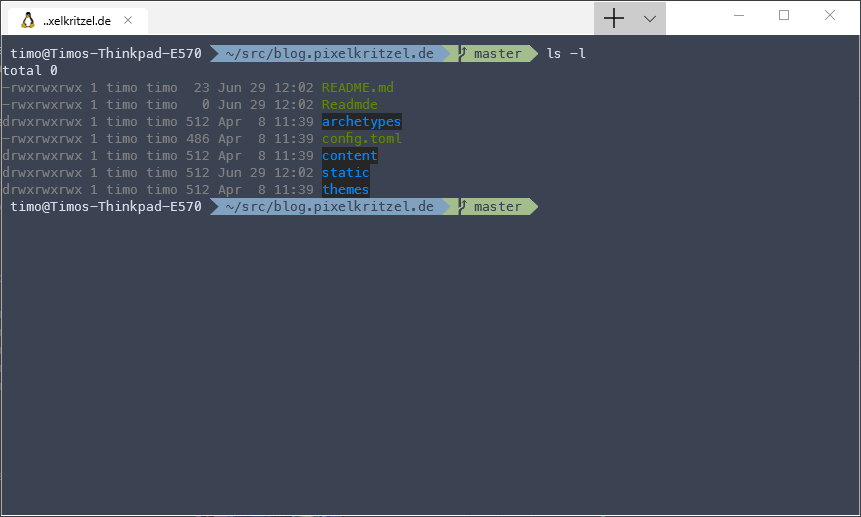
Microsoft released the preview of their new terminal application which looks promising and for some people it might be a replacement for third party termimal emulators. But it looks a little bit old faschioned to say it polite. Personally I’m a big fan of the Nord theme. So I added it to the terminal application and this how to it.
- Open the
profiles.jsonby selecting it in the menu or pressingCTRL+, - Add this to the
schemesentry of the json:
{
  "background" : "#3B4252",
  "black" : "#3B4252",
  "blue" : "#81A1C1",
  "brightBlack" : "#4C566A",
  "brightBlue" : "#81A1C1",
  "brightCyan" : "#8FBCBB",
  "brightGreen" : "#A3BE8C",
  "brightPurple" : "#B48EAD",
  "brightRed" : "#BF616A",
  "brightWhite" : "#ECEFF4",
  "brightYellow" : "#EBCB8B",
  "cyan" : "#B48EAD",
  "foreground" : "#D8DEE9",
  "green" : "#A3BE8C",
  "name" : "Nord",
  "purple" : "#B48EAD",
  "red" : "#BF616A",
  "white" : "#E5E9F0",
  "yellow" : "#EBCB8B"
}
This are the values I copied and pasted from the hyper-nord package.
- In the
profilessection you can assign acolorSchemeto a profile. So in my case: `“colorScheme”: “Nord”
You can find my configuration this gist